Marketing QR codes need a clear promise, a relevant landing page, and a measurable next action. This guide explains how to plan, design, test, publish, measure, and maintain the experience in multi-channel offline campaigns.
Explore useful GetQRly tools: Free QR Code Generator, WiFi QR Code Generator, WhatsApp QR Code Generator, Google Review QR Code Generator, Business Card QR Code Generator, and Restaurant Menu QR Code Generator.
Helpful guides: how to create a WiFi QR code, static vs dynamic QR codes, and Google Review QR Code Guide.
Introduction
QR code campaign tracking helps you understand which offline placements create useful digital actions. A scan count is helpful, but it is only the first signal. Strong reporting connects the printed placement to landing-page sessions, form submissions, bookings, orders, reviews, or support outcomes.
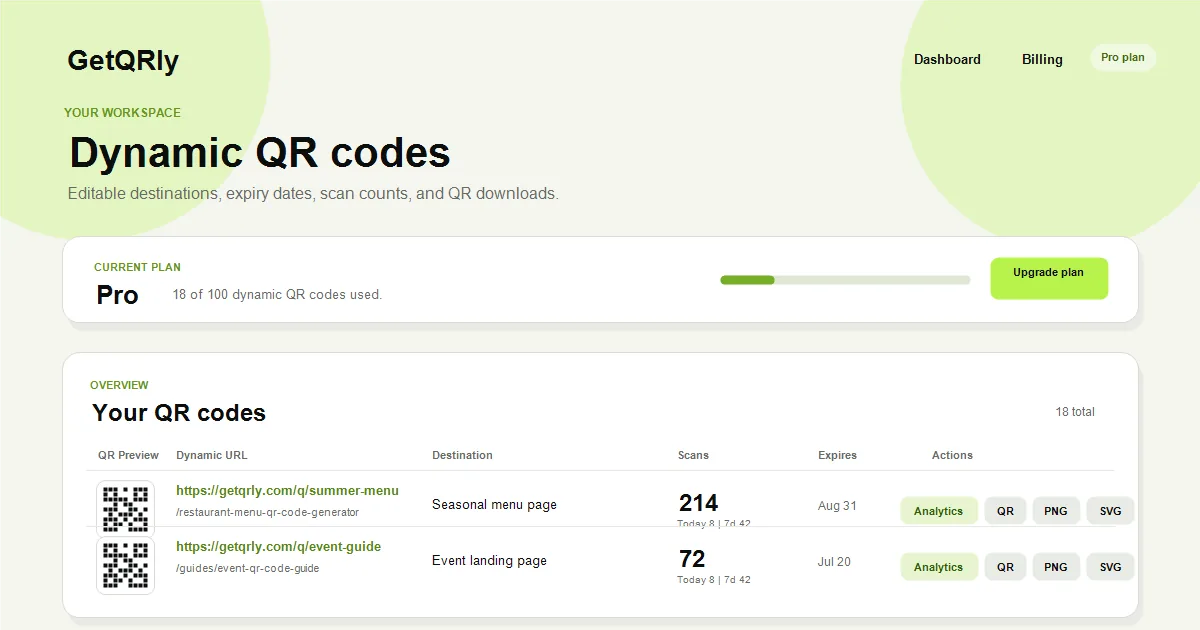
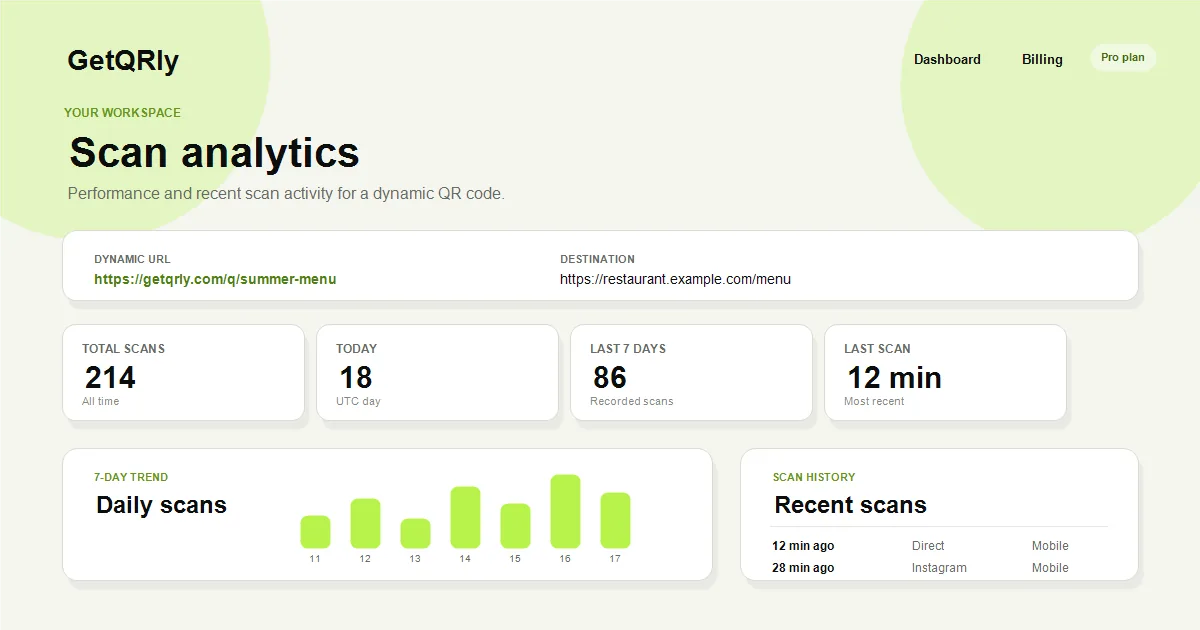
GetQRly dynamic QR codes already track scan history, scan counts, recent scans, and analytics summaries. For public static codes, you can still use campaign URLs and web analytics. The key is planning the measurement structure before the code is printed.
Real tracking examples
A restaurant can compare table cards, takeaway bag inserts, and window signs by giving each placement a different dynamic QR code. A direct mail team can compare postcards against catalog inserts. A packaging team can compare setup guide scans across SKUs or batches.
A campaign with posters in several locations can use separate URLs such as source=poster and location=downtown. A service business can track whether completion cards produce review-page visits. A retailer can compare shelf tags, receipts, and product labels.
Use QR Codes in Direct Mail, QR Codes on Product Packaging, and QR Code Marketing Strategy to plan practical measurement by channel.
How to use this QR code for tracking
Give each meaningful placement its own QR code or destination URL. Do not use one code for every poster, flyer, package, and receipt if you want to compare performance. Keep names simple and consistent so reports remain understandable.
Decide whether you need static or dynamic tracking. Static QR codes can include campaign parameters in the URL. Dynamic QR codes can count scans, record recent activity, support editable destinations, and help you avoid reprinting when a link changes.
After launch, compare scans with completed actions. A high-scan code with low conversion may need a clearer call to action or better landing page. A low-scan code with strong conversion may need more visible placement.
Best use cases
Campaign tracking is useful for direct mail, packaging, events, restaurant materials, posters, print ads, local services, trade shows, and product launches. It is especially valuable when several offline placements look similar but perform differently.
GetQRly is a good fit when you want editable dynamic QR codes, scan counts, recent scan history, and PNG/SVG downloads without storing QR images in the database. Use the dashboard for managed campaigns and the free generator for simple permanent links.
For WiFi sharing, use WiFi QR. For reviews, use Google Review QR. For social campaigns, use Instagram QR or a trackable landing page.
Create your QR code with GetQRly
Generate static and dynamic QR codes, download PNG/SVG files, and track scans from one dashboard.
Common mistakes
- Using one QR code across every channel and losing placement-level insight.
- Measuring scans without measuring conversions.
- Changing campaign URLs after printing static codes.
- Using confusing campaign names that make reports hard to read.
- Collecting more personal data than needed for basic analytics.
Another mistake is overengineering a small campaign. If you only need one permanent link, keep it simple. Use dynamic QR tracking when you need destination edits, scan history, expiry, or practical comparisons across placements.
Always test analytics before launch. Scan the final code, verify the redirect, confirm web analytics receives the visit, and check that reports show the expected campaign name.
Printing and testing tips
Tracking does not replace scanability. Print the code at the right size, keep contrast high, preserve the quiet zone, and test in the real environment. Bad artwork creates bad data because people cannot scan reliably.
Keep a campaign inventory with QR slug, destination URL, placement, owner, launch date, expiry date, and reporting goal. This is especially important when several teams create print materials at the same time.
Review results soon after launch. Early scan patterns can reveal broken links, poor placement, vague CTAs, or mobile page problems while there is still time to adjust the campaign.
Rate it after reading so we can keep improving GetQRly guides.